Take it up a notch.
Notchbird lives in your MacBook's notch. When Claude Code or Codex finishes, or stops to ask you something, it lights up with a button that opens that exact session.
14 days free with every feature, then from $2 a month. No card to start. macOS 14 or later.
Works with Claude Code Codex chats Agents on any machine over SSH Hidden from screen sharing
Agent alerts
Stop checking the terminal.
A long agent run leaves you two bad options. Watch the session, or wander off and come back twenty minutes after it stopped to ask you something. Notchbird watches it for you.
The island, in three states


Only the moments that need you.
Finished, blocked, or asking a question. Progress chatter stays in the session, and only a "needs you" alert makes a sound.
One click back to the exact thread.
Every alert opens the session it came from: the right Codex chat, the right Claude Code session, on whichever machine it runs.
Agents on another machine count too.
Point Notchbird at an SSH host you already use. It reads session state over that one connection and installs nothing on the remote machine.
Everything else
The rest of your day, one hover away.
Nine small tools share the same panel. Hover into the notch to open it and move away to close it. Turn off any section you don't need, and it runs nothing.
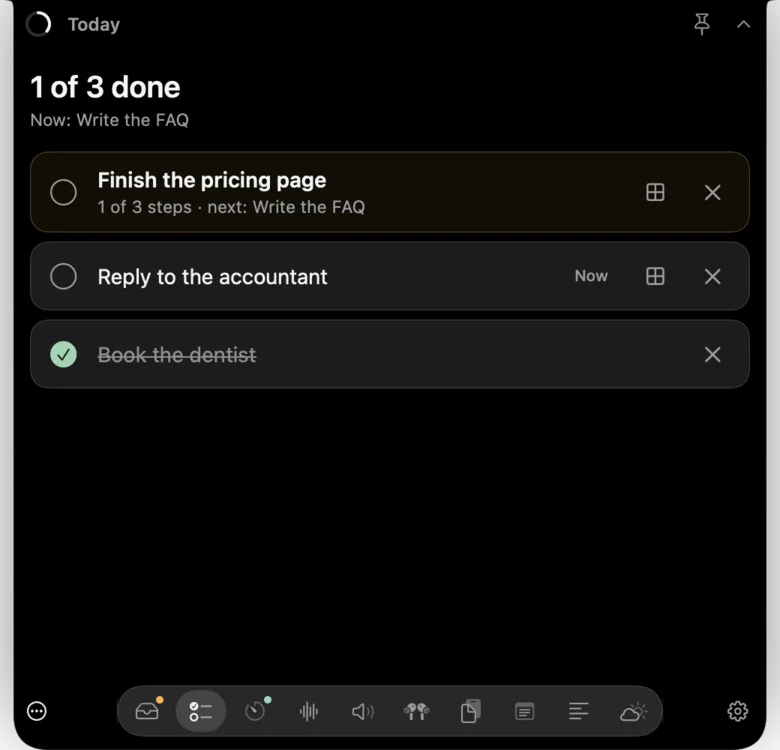
Also in the panel: drag a file onto the notch to AirDrop it, press ⌘K to search everything, and add your own actions from Shortcuts, apps or shell commands.
Privacy
Built to stay out of your screen share.
Hidden when you present
Notchbird is left out of screenshots, recordings and screen sharing by default, so nobody on the call sees your agent alerts.
Your prompts stay put
From Claude Code it reads the session title, tool names and a one-line preview of the latest reply. It never reports your prompts or tool inputs.
Permissions only on request
It asks for a permission when you first use the feature that needs it. Your history stays on your Mac, and there is no analytics or tracking.
Performance
Light enough to forget it's running.
Notch apps live on screen all day, so a slow or hungry one gets uninstalled. Every Notchbird build has to pass these budgets before it ships, measured on an M-series Mac.
- Your money back, no questions. Any payment is refundable in full for 14 days.
- Keeps working offline. A paid licence runs for 14 days without reaching our server, so an outage never locks you out.
- A real privacy policy. Your history stays on your Mac, and there is no analytics or tracking.
- Built to outlast us. If Notchbird ever stops, we will ship a final build that needs no licence, so the copy you paid for keeps working.
Pricing
Every feature, on every plan.
Try Notchbird free for 14 days with nothing held back. Then choose a plan, or pay once and own it.
Every plan includes
Use it on up to three of your Macs, with every new version included.
- Claude Code and Codex alerts
- Sessions on other machines over SSH
- Today, Focus and Sounds
- Audio, AirPods and Clipboard
- Notes, Prompter and Weather
- Email support from the person who builds it
Prices in US dollars. VAT or sales tax is added at checkout where it applies. Lemon Squeezy handles payment as merchant of record. Refunds within 14 days.
FAQ
Questions, answered.
What does Notchbird need to run?
A Mac running macOS 14 Sonoma or later. It is designed around the notch on recent MacBook Air and MacBook Pro models.
Agent alerts read Claude Code and Codex sessions over SSH from any Mac or Linux machine you can reach with an SSH alias. A Linux machine also needs Python 3.10 or later. Notchbird finds the other machines on your Tailscale network for you.
How does the free trial work?
Download Notchbird and use every feature for 14 days. You don't need an account or a card. When the trial ends, Notchbird asks you to subscribe to keep agent alerts and the sections running.
How do I activate Notchbird after subscribing?
Your receipt email contains a licence key. Open Notchbird, go to Settings, then Licence, paste the key and press Activate.
Can I use Notchbird on more than one Mac?
Yes. Every plan, including lifetime, covers up to three of your own Macs. To move it, deactivate a Mac in Settings, then Licence, and activate the new one.
What happens to my copy if Notchbird shuts down?
It keeps working. A paid licence already runs for 14 days without reaching our server, and if Notchbird ever stops, we will publish a final build that needs no licence at all. The trust page has the details.
How do I cancel?
Use the link in your receipt email or sign in at app.lemonsqueezy.com/my-orders. Notchbird keeps working until the end of the period you paid for.
Do you offer refunds?
Yes. Email hello@notchbird.com within 14 days of any payment and it will be refunded in full. The refund policy has the details.
Can Notchbird see my code or prompts?
From Claude Code transcripts Notchbird reads the session title, turn boundaries, tool names and a one-line preview of the latest reply. It never reports your prompts or tool inputs.
Nothing about your sessions is sent to us, and Notchbird has no analytics or tracking. The privacy policy lists the few outside services it talks to.
Will Notchbird appear when I share my screen?
No. By default Notchbird is left out of screenshots, screen recordings and screen sharing. You can change that in Settings, then Privacy.
I used Halo. Is this the same app?
Yes. Notchbird was called Halo before version 0.7. On first launch it brings over your Halo settings and history.
Is Notchbird made by Anthropic or OpenAI?
No. Notchbird is an independent app. It works with Claude Code and Codex and is not affiliated with Anthropic or OpenAI.
Your agent finishes. You'll know.
Free for 14 days, then $24 a year, $3 a month, or $49 once.