Guide
Get notified when Claude Code or Codex on a remote machine needs you
Agents run longer and harder on a beefy Linux box or a cloud VM. The catch is that the alert happens over there, and you're over here. These are the ways to bring it back to your Mac.
The short answer
- One session in a modern terminal: Claude Code's built-in notification travels back through SSH to Ghostty, Kitty or iTerm2. In tmux, turn on passthrough.
- Phone or desktop push from any machine: a hook that posts to a push service such as ntfy.
- Many sessions across several machines: a watcher on your Mac that reads every session over SSH, such as Notchbird.
1. Let the terminal carry it
When Claude Code finishes or waits for permission, it sends a terminal escape sequence. Over SSH that sequence reaches your local terminal, and Ghostty, Kitty and iTerm2 turn it into a macOS notification. In iTerm2, enable Send escape sequence-generated alerts under Settings → Profiles → Terminal → Filter Alerts.
Inside tmux, add this to ~/.tmux.conf on the remote machine, or tmux swallows the sequence:
set -g allow-passthrough on
For Codex, set notifications in the [tui] section of ~/.codex/config.toml on the remote machine; it uses the same OSC 9 sequence. The limit: the alert only arrives while that terminal window is open and attached.
2. Push from a hook
A hook runs on the remote machine, so have it send a push notification instead of playing a sound. With ntfy, subscribe to a hard-to-guess topic in the ntfy app on your Mac or phone, then add a Claude Code hook in ~/.claude/settings.json on the server:
{
  "hooks": {
    "Notification": [
      {
        "hooks": [
          { "type": "command",
            "command": "curl -s -d 'Claude Code needs you on build-box' ntfy.sh/your-secret-topic" }
        ]
      }
    ]
  }
}
For Codex, point notify in ~/.codex/config.toml at a script that does the same with the JSON it receives. Anyone who knows the topic name can read the messages, so keep it secret or self-host ntfy, and keep project details out of the text.
3. Watch every machine from your Mac
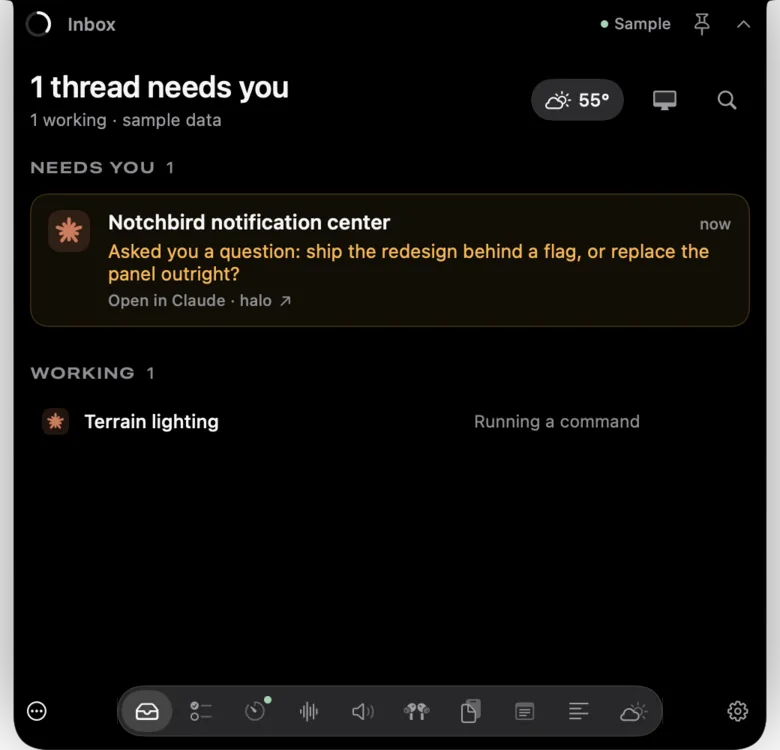
Notchbird turns it around. Instead of each machine pushing alerts, your Mac watches them. You give it an SSH host alias you already use, and it streams session state from Claude Code and Codex on that machine over one SSH connection, every two seconds. It installs nothing on the server, and it finds the rest of your machines on Tailscale.
- One inbox for every session on every machine, grouped into needs you, finished and working.
- The notch turns amber when any of them waits for you, and one click opens that exact thread.
- No hooks, no push service, no third party seeing your project names.
Which should you use?
| Method | Works when the terminal is closed | Many machines | Setup on the server |
|---|---|---|---|
| Terminal escape sequence | No | One alert per window | tmux passthrough |
| Push hook | Yes | Yes, one topic | A hook per machine |
| Notchbird | Yes | One inbox for all of them | None |
Common questions
Do Claude Code notifications work over SSH?
Yes. Claude Code's built-in notification is a terminal escape sequence that travels back over SSH. Ghostty, Kitty and iTerm2 show it as a macOS notification; in tmux you must set allow-passthrough on.
How do I get a phone notification when Claude Code on my server finishes?
Add a Notification or Stop hook on the server that posts to a push service such as ntfy, then subscribe to that topic in the ntfy app on your phone.
Does Notchbird need anything installed on the remote machine?
No. Notchbird reads Claude Code and Codex session state over one SSH connection using an SSH host alias you already have. The machine needs Python 3.9 or later.
Want this without wiring up hooks? Notchbird shows Claude Code and Codex alerts in your MacBook's notch, with one click back to the session.
Try Notchbird free