Guide
How to get notified when Claude Code finishes or needs you
Claude Code can alert you when it finishes or stops for a permission prompt. Which method works depends on your terminal, and whether the session runs on your Mac or on another machine.
The short answer
- Ghostty, Kitty or iTerm2: Claude Code already sends a desktop notification when it finishes or needs permission while you're away from the terminal. iTerm2 needs one setting turned on (below).
- Any other terminal: set
"preferredNotifChannel": "terminal_bell"in~/.claude/settings.json, or add aNotificationhook that runs a command. - Several sessions, or sessions on other machines: use a tool that watches every session at once, such as Notchbird.
1. Built-in desktop notifications
When Claude finishes a task or pauses for a permission prompt and you seem to be away from the terminal, Claude Code fires a notification. By default it shows a desktop notification only in Ghostty, Kitty and iTerm2.
In iTerm2, open Settings → Profiles → Terminal, check Notification Center Alerts, then click Filter Alerts and enable Send escape sequence-generated alerts. Also make sure your terminal app is allowed to send notifications in System Settings → Notifications.
The notification reaches your Mac over SSH too, so a remote session can still alert you. If you use tmux, add set -g allow-passthrough on to ~/.tmux.conf or tmux swallows it.
2. The terminal bell
In Apple Terminal, Warp, the VS Code terminal and others, ask Claude Code to ring the bell instead, in ~/.claude/settings.json:
{
  "preferredNotifChannel": "terminal_bell"
}
Apple Terminal can show a badge on its Dock icon when the bell rings. Check that Audible bell is on under Settings → Profiles → Advanced, because Claude Code's first-run terminal setup may have turned it off.
3. Hooks for a custom alert
Hooks run your own command on Claude Code events, in any terminal. Two events matter here:
| Event | Fires when |
|---|---|
Notification | Claude Code sends you a notification. Filter with a matcher such as permission_prompt, idle_prompt, agent_needs_input or agent_completed. |
Stop | Claude finishes responding, on every turn. It takes no matcher. |
This example shows a macOS notification when Claude needs permission, and plays a sound whenever it finishes a turn. Add it to ~/.claude/settings.json:
{
  "hooks": {
    "Notification": [
      {
        "matcher": "permission_prompt",
        "hooks": [
          { "type": "command",
            "command": "osascript -e 'display notification \"Claude Code needs your permission\" with title \"Claude Code\"'" }
        ]
      }
    ],
    "Stop": [
      {
        "hooks": [
          { "type": "command", "command": "afplay /System/Library/Sounds/Glass.aiff" }
        ]
      }
    ]
  }
}
A Notification hook receives JSON on standard input with session_id, cwd, notification_type and message, so a script can include the project name in the alert. Hooks run alongside the built-in notification and cannot block it.
Hooks have limits. They run on the machine where Claude Code runs, so a session on a remote box plays its sound on that box. A Stop hook also fires after every turn, which gets noisy in long sessions.
4. Notchbird: every session, in the notch
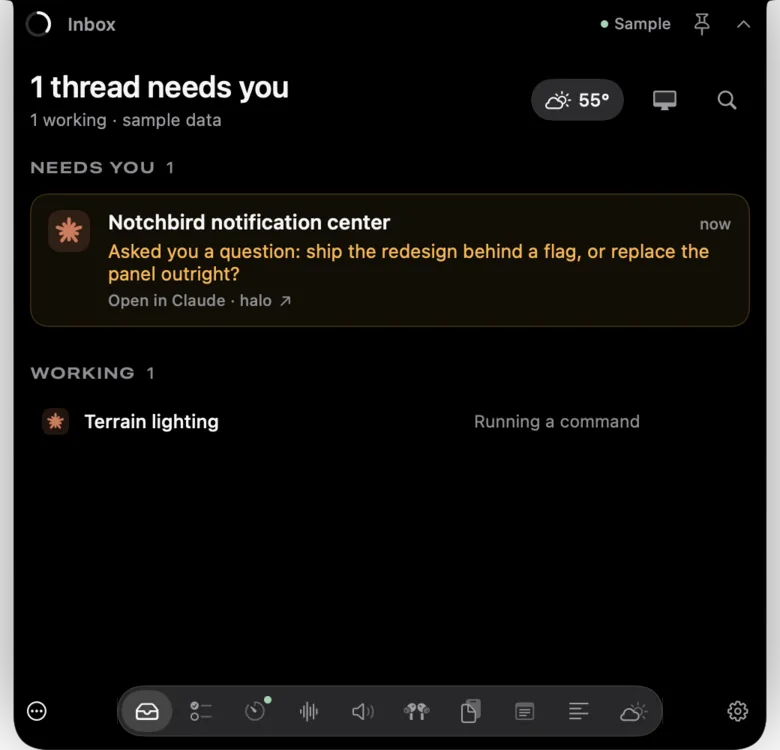
Notchbird is a Mac app that lives in your MacBook's notch. It reads your Claude Code and Codex sessions over SSH from any Mac or Linux machine you can reach, and shows only the moments that need you: a green ring when a session finishes, and amber when one is waiting for your decision. Answer Claude Code's permission prompts with Allow or Deny right in the notch, or click through to that exact session.
- Alerts need no hooks and nothing installed on remote machines. Approving from the notch is an opt-in hook, and Notchbird shows you the exact change first.
- One place for every session across your machines, instead of one alert per terminal.
- Hidden from screen sharing by default, so alerts never appear in a demo.
Which should you use?
| Method | Setup | Remote sessions | Many sessions |
|---|---|---|---|
| Built-in notification | None in Ghostty or Kitty, one setting in iTerm2 | Yes, through the terminal | One alert per terminal |
| Terminal bell | One setting | Yes, through the terminal | Hard to tell apart |
| Hooks | JSON plus a script | Runs on the remote machine | One alert per session |
| Notchbird | Install the app, add an SSH alias | Yes, over SSH | One inbox for all of them |
Common questions
Why don't I get Claude Code notifications in Apple Terminal?
By default Claude Code sends desktop notifications only in Ghostty, Kitty and iTerm2. In Apple Terminal, set preferredNotifChannel to terminal_bell in ~/.claude/settings.json, or add a Notification hook.
How do I get notified every time Claude Code finishes a turn?
Add a Stop hook in ~/.claude/settings.json that runs a command such as afplay or osascript. The Stop event fires every time Claude finishes responding.
Do Claude Code notifications work over SSH?
Yes. The built-in desktop notification travels back through your terminal, and Ghostty and Kitty forward it to macOS. In iTerm2 enable escape sequence alerts, and in tmux enable allow-passthrough. Hooks run on the remote machine instead.
Want this without wiring up hooks? Notchbird shows Claude Code and Codex alerts in your MacBook's notch, with one click back to the session.
Try Notchbird free