Guide
How to get notified when Codex finishes or needs approval
Codex can tell you when a turn completes or when it is waiting for your approval. There are two built-in ways to set it up, and each has its limits.
The short answer
- Inside the terminal: turn on
notificationsin the[tui]section of~/.codex/config.toml. - Run your own command when a turn completes: set
notifyto a script in the same file. - Every chat on every machine in one place: use Notchbird.
1. Built-in TUI notifications
The Codex terminal interface can send a terminal notification for chosen events. It uses an OSC 9 escape sequence where the terminal supports it and falls back to the bell.
# ~/.codex/config.toml
[tui]
notifications = ["agent-turn-complete", "approval-requested"]
notification_method = "auto"        # "auto", "osc9" or "bel"
notification_condition = "unfocused" # or "always"
Setting notifications = true turns on every event. Ghostty, Kitty, iTerm2 and WezTerm show OSC 9 messages as desktop notifications; other terminals ring the bell.
2. A notify script
The notify key runs a program of your choice and passes it one JSON argument. Today it fires for agent-turn-complete, with the thread-id, turn-id, cwd, input-messages and last-assistant-message.
# ~/.codex/config.toml
notify = ["python3", "/Users/you/.codex/notify.py"]
# ~/.codex/notify.py
import json, subprocess, sys

event = json.loads(sys.argv[1])
if event.get("type") == "agent-turn-complete":
    text = (event.get("last-assistant-message") or "Turn complete")[:120]
    subprocess.run(["osascript", "-e",
        f'display notification {json.dumps(text)} with title "Codex"'])
The script runs where Codex runs. On a remote machine, osascript isn't available and the alert never reaches your Mac. And because notify covers completed turns only, approval requests need the TUI setting above.
3. Notchbird: Codex chats in the notch
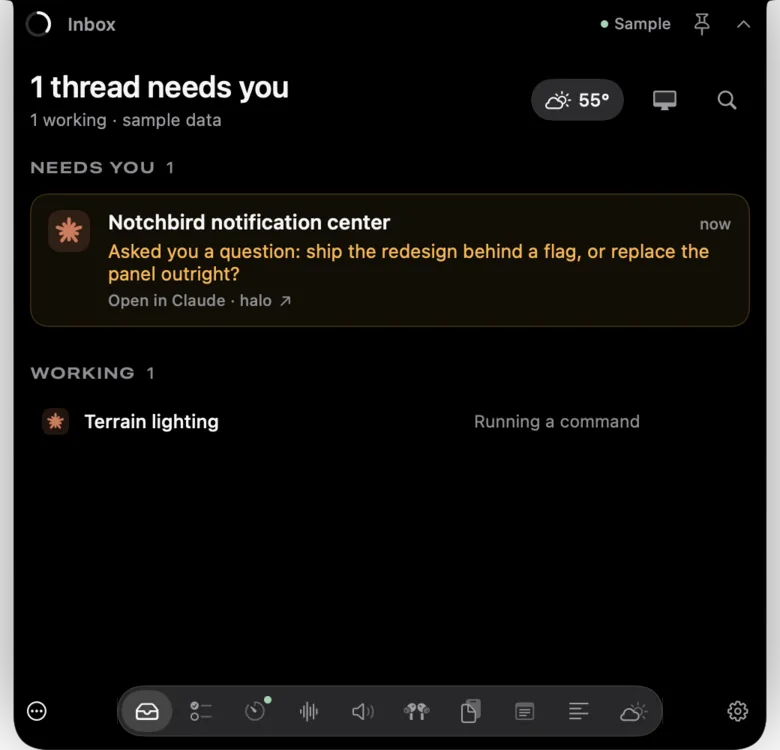
Notchbird reads up to 16 recent Codex chats from CODEX_HOME or ~/.codex over your existing SSH connection, alongside your Claude Code sessions. When a chat finishes, a green ring appears in the notch. When one waits for your approval, the island turns amber with a button that opens that exact thread through a codex://threads/ link.
- No changes to
config.tomland no scripts on remote machines. - Approvals and finished turns, from every machine, in one inbox.
- Hidden from screen sharing by default.
Which should you use?
| Method | Approvals | Remote sessions | Setup |
|---|---|---|---|
| TUI notifications | Yes | Through the terminal, if it supports OSC 9 | Three lines of TOML |
| notify script | No, completed turns only | Runs on the remote machine | A config line and a script |
| Notchbird | Yes | Yes, over SSH | Install the app, add an SSH alias |
Common questions
Does Codex have built-in notifications?
Yes. Set notifications in the [tui] section of ~/.codex/config.toml to true or to a list of events such as agent-turn-complete and approval-requested.
What does the Codex notify setting send?
notify runs your program with one JSON argument containing type (agent-turn-complete), thread-id, turn-id, cwd, input-messages and last-assistant-message.
Can I get Codex approval requests as macOS notifications?
Yes, through the TUI notifications setting with approval-requested in the list, in a terminal that shows OSC 9 notifications. The notify script does not fire for approvals.
Want this without wiring up hooks? Notchbird shows Claude Code and Codex alerts in your MacBook's notch, with one click back to the session.
Try Notchbird free